Features
Everything Faktwise does
Automatic e-invoices for your Shopify store: ZUGFeRD, XRechnung, correct VAT, and an archive designed around the German GoBD record-keeping rules.
After setup, eligible paid orders follow your saved automatic-invoicing settings. You can also choose which observed order sources invoice automatically. This page lists what the app does, and just as openly, what it does not do.
Choose which orders receive invoices
Select several order-source groups observed in your store. With source selection active, unselected or unknown paid orders wait in Orders needing review, without an invoice number or email.
- Existing shops keep their current behavior until they activate source selection
- New installations start with the initial own-store source rule; unrecognized sources wait for review
- Choose future orders only, or pending and future orders, whenever you change sources
- Future-only changes leave already queued work on its previous rule; an imported queued order may still invoice
- Request one invoice for an eligible held order, with a separate customer-email choice that starts off, or dismiss it
- Track the request from queued to issued; enabling a source does not silently release already-held orders
These are observed Shopify source groups, not order tags or a guarantee of marketplace-specific identification. One group may cover several marketplaces. Set up your source choices.
E-invoice formats: PDF, ZUGFeRD, XRechnung
A ZUGFeRD invoice is a readable PDF with embedded invoice data. ZUGFeRD is a hybrid format: a regular PDF (PDF/A-3) with the machine-readable invoice XML per the EU standard EN 16931 embedded inside. When a public-sector buyer enters a Leitweg-ID (the routing ID German authorities use to deliver invoices internally), Faktwise issues an XRechnung instead, the structured XML format used for invoices to German public-sector buyers.
- ZUGFeRD hybrid PDF (PDF/A-3 with embedded EN 16931 XML) for eligible invoices
- XRechnung for public-sector (B2G) orders that carry a Leitweg-ID
- XRechnung needs your contact email and IBAN in Settings, because the standard's rules require seller contact and payment details; if they are missing, the order is issued as ZUGFeRD and the dashboard shows a notice
- Invoice language German or English
- Release verification checks sample documents with KoSIT for XRechnung and Mustang and veraPDF for ZUGFeRD
Format deep dive: ZUGFeRD invoices with Shopify
The right VAT, applied automatically
Faktwise reads the order, picks the correct tax treatment, and prints the matching legal wording on the invoice automatically. A provided EU VAT ID is checked live against VIES, the official EU system for validating VAT IDs, at invoice time. If VIES is unreachable, Faktwise charges VAT as the cautious default.
- German domestic sales: 19% VAT, plus the reduced 7% rate per line when the Shopify order data marks a line as reduced
- B2B services to other EU countries: Reverse Charge under §13b UStG, meaning the buyer accounts for the VAT; the note is printed and no VAT is charged
- B2B goods to other EU countries: tax-free intra-Community supply (§4 No. 1b, §6a UStG)
- B2C sales to other EU countries: OSS at the destination country's standard VAT rate, once you have switched OSS on in Settings
- Exports outside the EU: tax-free under §4 No. 1a, §6 UStG
- Kleinunternehmer (the German small-business scheme under §19 UStG): invoices never show VAT, with the correct note
Deep dive: Reverse charge for intra-EU sales
Capture B2B and public-sector buyers
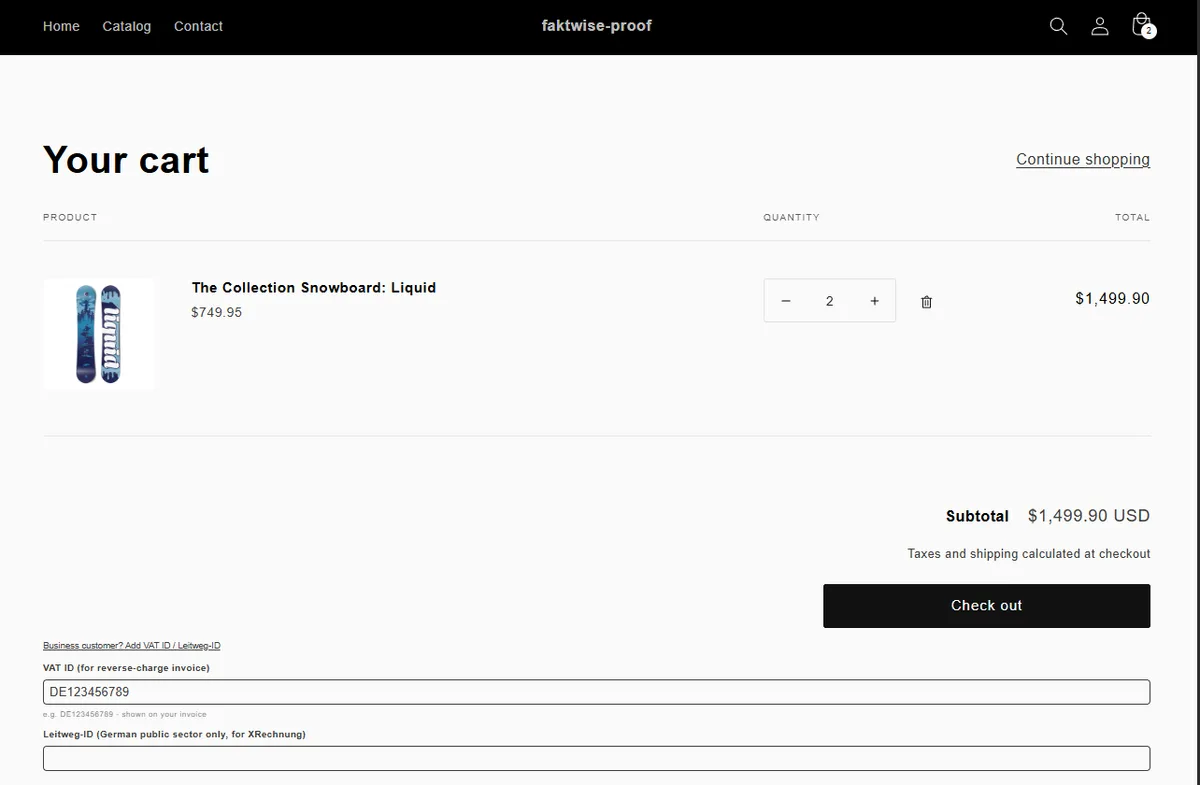
For a VAT ID or Leitweg-ID to end up on the invoice, the buyer needs somewhere to enter it. Faktwise ships a theme app block for the cart page that you add once in the theme editor. It stays collapsed behind a business-customer toggle, so private buyers only see a small switch.
- Add it once: Online Store, then Themes, then Customize, switch to the Cart template, Add section (Apps), Faktwise VAT / Leitweg-ID, Save
- Buyers expand the field and enter their VAT ID and/or Leitweg-ID
- VAT ID format check on entry (a 2-letter country prefix plus 2 to 12 characters)
- Works on all Shopify plans, because the field lives on the cart page; extra checkout-step fields exist only on Shopify Plus
- The Faktwise Settings page deep-links straight to the right spot in the theme editor
How it fits together: Shopify B2B invoices with VAT ID and Reverse Charge
A GoBD-ready archive
The GoBD are the German rules for keeping digital business records: complete, traceable, and protected against later changes. Faktwise is designed around these requirements and helps you meet them.
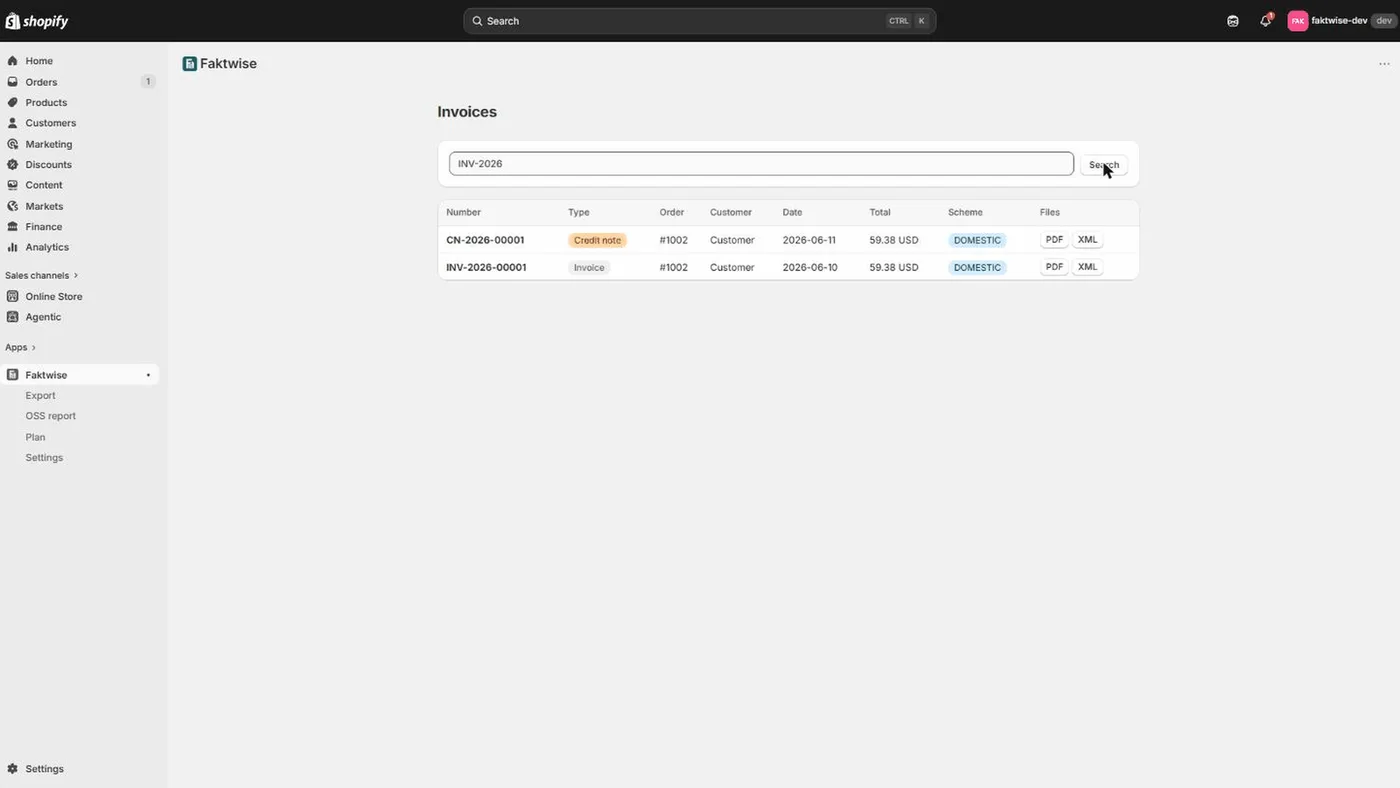
- Gap-free sequential invoice numbers per year (for example INV-2026-00042); if a generation fails, no number is burned
- Issued invoices are never edited afterwards; corrections happen only through credit notes
- A supported refund against an existing Faktwise invoice creates a credit note referencing the original invoice number
- PDF and XML are stored for ten years, beyond the statutory eight-year German retention period
- Every document, correction, and settings change is recorded in an append-only audit trail (the traceability the GoBD ask for)
- Personal data is encrypted at rest (AES-256-GCM)
- Export your archive via the monthly export before uninstalling the app
More on the requirements: GoBD invoice archiving with Shopify
OSS report with BOP import file
The One-Stop-Shop (OSS) is the EU scheme that lets you report VAT on B2C sales to other EU countries in a single quarterly return, filed in Germany with the BZSt, the Federal Central Tax Office. Faktwise prepares the numbers so you do not have to add them up by hand.
- Quarterly summary of your OSS sales grouped by destination country and VAT rate: net, VAT, and document count
- Readable summary CSV for your records
- BOP CSV in the official #v2.0 import format: import it into your OSS-EU return in the BZSt-Online-Portal (BOP) instead of typing the figures
- Rows that cannot go into the file (for example a country whose refunds exceed its sales in the quarter) are listed with a note; corrections for earlier quarters are entered manually in the portal
- Always check the figures in the portal before you submit
How OSS works with Shopify: EU OSS VAT for Shopify
Exports, email, and extras
Creating invoices is half the job; they also need to reach your accountant and your customer. Faktwise covers both.
- Monthly export as a ZIP: all PDFs, all XMLs, and a summary CSV (semicolon-separated, opens cleanly in German Excel) for your accountant
- Automatic invoices for eligible paid orders under your saved settings and source choices
- Optional automatic email of the invoice PDF to your customer, with a German or English template (off by default)
- Dashboard with the invoice list (newest first), search by invoice number or order, and PDF plus XML downloads on every row
- Reliable by design: if an invoice ever fails to generate (a temporary API hiccup), the job retries automatically with backoff, up to five attempts, and the dashboard flags anything that still fails so nothing is silently lost
- GDPR: Faktwise responds to Shopify's customer data-request and redaction webhooks, and removes your operational personal data (contact, bank details, settings) after uninstall; issued invoices are retained for the statutory record-keeping period
- Free validator: the invoice validator checks any XRechnung XML (official KoSIT validator) or ZUGFeRD PDF (Mustang, including PDF/A) at no cost
Hand-over to your accountant: The monthly export
What Faktwise does not do
Honesty saves you time: these are the things Faktwise deliberately does not do, or does not do yet.
- No tax advice: Faktwise is software, not tax advice. Whether a tax treatment applies to your business is a question for your tax advisor.
- Source selection does not import marketplace orders or change Shopify checkout tax. Product-level mixed in-person/online event tax rules and Peppol delivery are not included.
- OSS uses the destination countries' standard VAT rates; reduced destination rates are not applied. The EU-wide EUR 10,000 threshold is not computed automatically either: you decide when to activate OSS.
- Reverse Charge covers EU cross-border B2B sales only; domestic German §13b cases are not covered.
- Refund support depends on the original document and verified refund evidence. Source-selected handling can include supported shipping refunds; custom amounts or incomplete history need attention. The legacy path does not cover shipping-only or custom-amount refunds. Refund details.
- No DATEV booking export: the monthly ZIP is a summary for your accountant, not a DATEV booking file. The full Shopify-to-DATEV export is our separate app EasyBelege.
- No template or layout editor: a legally valid e-invoice (ZUGFeRD/XRechnung) is a fixed, standardized format under EN 16931. That fixed structure is exactly what makes it accepted by the tax office and accounting software, so it is deliberately not freely redesignable. Faktwise produces the correct, compliant format; if you want to design invoice layouts freely, a layout app like Order Printer is the better fit.